Skip to content
Wednesday, August 19, 2026
MALIKA KAROUM METAVERSE

MALIKA KAROUM METAVERSE

– THE NEW WEB 3.0 FUTURE –

  • Definitions of Metaverse
  • Malika Karoum: Artificial Intelligence
  • Malika Karoum: ChatGPT
  • Malika Karoum Metaverse
    • Metaverse Digital Virtual Environment
    • A FUTURE METAVERSE
    • METAVERSE -THE NEW FUTURE-
    • Art – The Next Generation
    • The New Web 3.0
    • Metaverse project
    • What are Non Fungible Tokens (NFT-tokens)?
    • What are NFTs?
  • Malika Karoum Media

How to Secure Your Nintendo Account on Your Switch

Malika Karoum Online News
April 28, 2020April 28, 2020Malika Karoum DubaiLeave a Comment on How to Secure Your Nintendo Account on Your Switch
nintendo-switch-secure

While you might not think of your Nintendo account as a prime target for attack, thanks to reports of fraudulent activity, the company is now urging you to secure your Nintendo account by enabling two-factor authentication.

So, in this article we’ll show you how to secure your Nintendo account so that everything on your Switch stays safe. Note that most of these steps must be done using your computer or phone rather than the Switch itself.

1. How to Enable Two-Factor Authentication on Your Nintendo Account

Two-factor authentication increases your account security by requiring a code from your phone in addition to your password in order to log in. This dramatically increases the security of your account.

You can help secure your Nintendo Account by enabling 2-Step Verification.

For more details, visit: https://t.co/kqxbp8TobD pic.twitter.com/hZ1PnFWZQw

— Nintendo of America (@NintendoAmerica) April 9, 2020

To enable two-factor authentication (2FA), head to the Nintendo Account login page and sign in with your username and password. Depending on your linked accounts, you may also be able to sign in with a Nintendo Network ID or social media account.

Once you’ve signed in, you’ll see your account settings. Click the Sign-in and security settings tab on the left, then find the 2-Step Verification settings header at the bottom. Click Edit to proceed.

Nintendo Account Security Page

On the resulting screen, you’ll see Not set under 2-Step Verification. Select the 2-Step Verification setup button to continue on. The site will then ask you to verify your email address; click Send email if it’s correct.

If it isn’t, select User info from the left sidebar and click Edit next to E-mail address to change it.

You’ll then receive an email from Nintendo with a verification code. Enter that code and click Submit to move forward.

Installing a 2FA App on Your Phone

At this point, you’ll need to install an authenticator app on your phone if you don’t use one already. Nintendo recommends Google Authenticator, but Authy is one of the best alternatives to Google Authenticator.

Authy works on multiple devices, so it’s easier to migrate if you get a new phone or lose yours. Plus, you can install Authy on your computer for convenience, back up accounts to the cloud, and protect the app with a PIN.

Install Authy for Android or iPhone. After you open it, you’ll need to enter your phone number to receive a confirmation code. Then you’ll be ready to add new accounts into Authy.

Tap Add Account (which appears under the three-dot menu button at the top-right on Android) followed by Scan QR Code. Use your phone’s camera to scan the code that appears in Step 2 on Nintendo’s website.

If this doesn’t work, select Enter Code Manually in Authy, expand the Manual input option on Nintendo’s page, and enter that code to link the app.
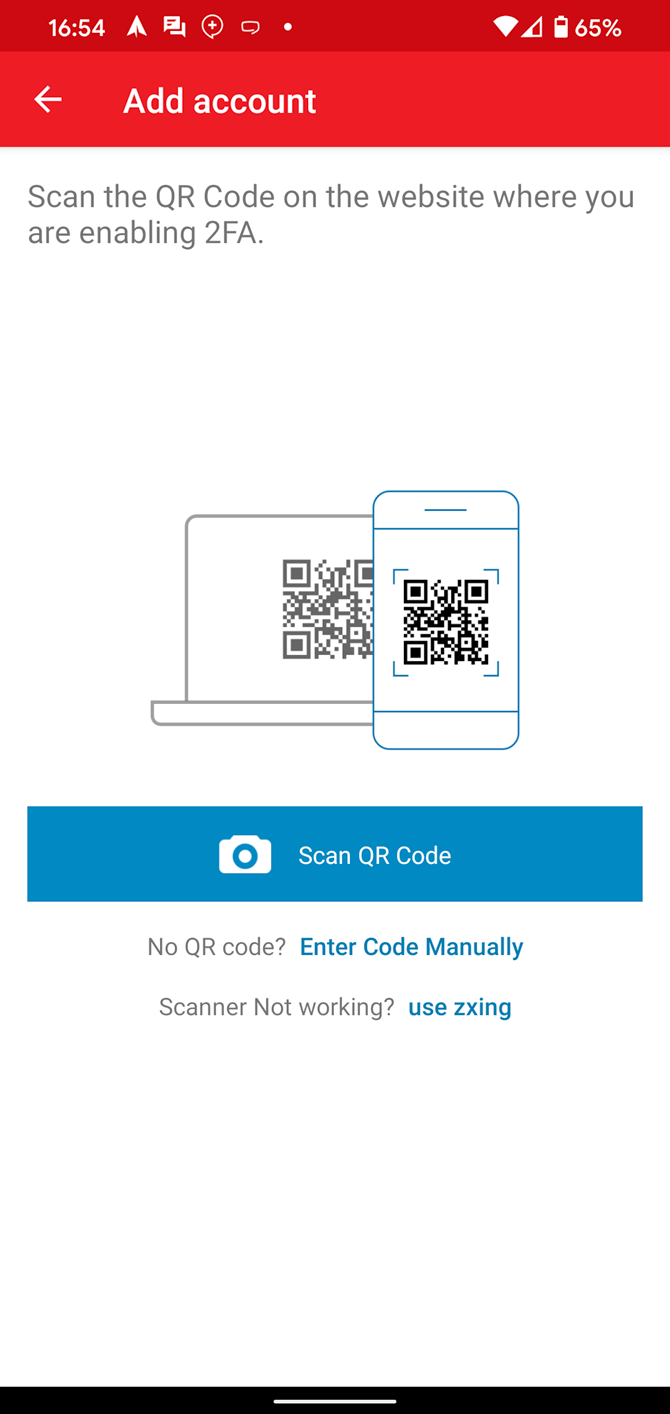
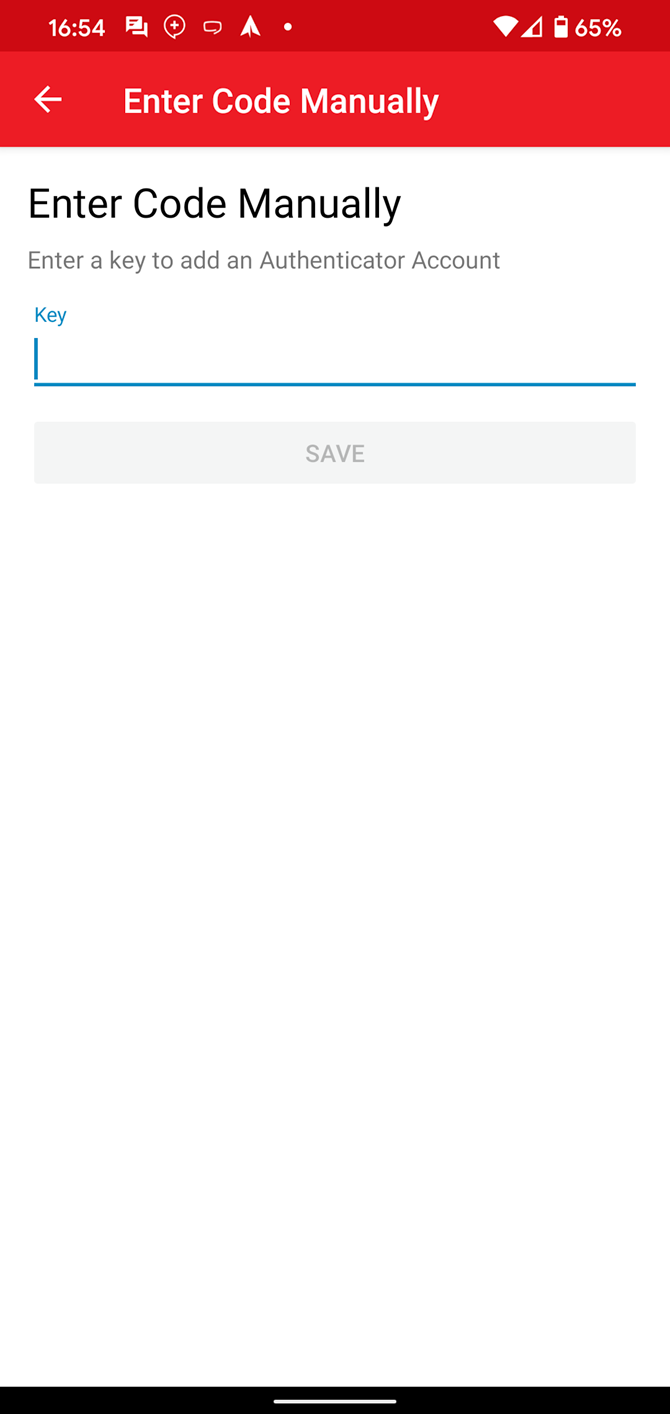
You’ll then start seeing codes generate in Authy. Enter the current code in Step 3 on the website to confirm everything is working properly.

Finally, you’ll see several backup codes. These allow you to log into your Nintendo account even if you can’t access your two-factor authentication method. It’s important that you write them down or save them someplace safe (start using a password manager if you don’t already) so that you don’t get locked out of your account. Note that these are single-use, but you can generate more if needed.

Using Two-Factor Authentication

That’s all you need to do in order to set up two-factor authentication on your Nintendo account. Now, when you sign in on a new device, you’ll need to submit a code from Authy after you enter your password.

Nintendo Account 2FA Sign In

If you ever need to review your backup codes or want to turn off two-factor authentication, return to the above 2FA page. Choose Review backup codes to check yours or generate new ones, or Delete settings to remove 2FA from your Nintendo account.

Nintendo 2FA Settings

2. How to Change Your Nintendo Account Password

Two-factor authentication is vital for protecting your account, but it’s not the only step you should take. Setting a strong password that you haven’t used anywhere else is important as well. It’s a good idea to change yours if you haven’t done so in a while.

To change your password, head to Sign-in and security settings again on your Nintendo account page and click Edit next to Change password. Enter your current password, then you’ll be prompted for a new one.

Switch Confirm Password

Unfortunately, the service limits you to 20-character passwords. We recommend that you use a password manager to create and store a strong password for your account.

3. How to Review Your Nintendo Account Sign-in History

While you’re making your Nintendo account more secure, you should make sure that no unauthorized devices have signed into it. On the Sign-in and security settings page, you’ll see a Sign-in history section. Click View to see full details on this.

Nintendo Account Sign in History

This shows you every device that has logged into your Nintendo account over the last 30 days. Note that it counts each browser as a different device, so you may see what appear to be duplicates.

The location is unfortunately limited to the country, so it’s not particularly helpful if you think someone in your region may have broken into your account. To be safe, you can click the Sign out from all devices link below the list to end all sessions.

If you sign out of all devices because you think someone has broken into your account, you should immediately change your password to keep them from signing back in.

4. How to Disconnect a PayPal Account From Your Nintendo Account

For convenience, you can link your PayPal account to your Nintendo account. This allows you to fund purchases on the Nintendo Switch eShop through a PayPal payment method.

However, you should consider disabling this for security. In April 2020, many people complained that bad actors had broken into their Switch and used their PayPal account to spend hundreds of dollars on in-game items—usually V-Bucks in Fortnite.

Someone hacked my PayPal and spent $ 200 on Nintendo games?! pic.twitter.com/pc5eRvHXSY

— Vexonym (@Vexonym) April 19, 2020

Click the Shop menu link on the left-side of your Nintendo account settings page to open a new tab with eShop preferences. Here you’ll see if you have a credit card or PayPal information saved on your account.

Nintendo Account Payment

Choose Delete to remove a saved credit card, if you have one. Below, you can Unlink your PayPal account if you’ve connected it in the past.

Scroll down and select Purchase History to review recent transactions on your account if you want to check for foul play.

Paying on the eShop

After you remove all saved payment details for your account, you’ll have to enter your credit card number each time you make a purchase on the eShop. This is inconvenient, but will prevent anyone who breaks into your account from abusing your payment method.

If you have any recurring charges associated with your account, such as a Nintendo Switch Online subscription, you’ll need to have enough funds to automatically renew them. Your subscription will end if you don’t have enough to cover the cost when the renewal date comes.

To add funds to your account without linking a payment method, you can purchase Nintendo eShop gift cards. These are available digitally with instant delivery on Amazon, as well as physically in supermarkets, drug stores, GameStop, and other retailers.

$ 20 Nintendo eShop Gift Card $ 20 Nintendo eShop Gift Card Buy Now On Amazon $ 20.00

Secure Your Nintendo Account

We’ve looked at a few simple ways to keep your Nintendo account safe and secure. There’s little chance of someone breaking into your account if you use a secure password and 2FA, but it’s still good to take steps for maximum security.

Consider enabling alerts with your credit card company so that you know right away if someone makes an unauthorized charge on your account. And if you do become a victim of fraud, you should contact Nintendo before contacting your credit card company. Some people have reported that Nintendo won’t look into cases that were already marked as fraud.

If you play on other systems too, make sure you know how to enable two-factor authentication on all of your gaming accounts.

Read the full article: How to Secure Your Nintendo Account on Your Switch

MakeUseOf

Tagged AccountNintendoSecureSwitch

Post navigation

Stay Positive With Spotify’s Daily Wellness Playlist
You Can Now Donate to Charity Using TikTok Donation Stickers

Related Posts

Apple Recommends You Don’t Cover Your MacBook Camera

July 13, 2020July 13, 2020Malika Karoum Dubai

You Can Now Unlock Pandora Premium by Watching Ads

December 14, 2017Malika Karoum Dubai

The 8 Best ProtonMail Alternatives for Your Email Security

April 4, 2021April 4, 2021Malika Karoum Dubai

RSS Malika Karoum Global News

  • Longtime Toronto councillor Paula Fletcher announces retirement
    Fletcher said she’s still councillor until the fall and said she’ll continue answering calls for broken branches or sewer issues, like she has this week.
    Matthew Bingley
  • Big auntie earring competitions a standout event at Treaty Days celebrations
    Big auntie earring competitions have taken Treaty Days celebrations by storm on many First Nations across the Prairies as a tongue-in-cheek ode to Indigenous-made earrings.
    Melissa Ridgen
  • Vancouver stranger assault suspect denied bail
    A publication ban prevents us from reporting on the evidence and submissions at the bail hearing, and the reasons behind the judge’s decision to detain the accused.
    Kristen Robinson
  • Saskatchewan courts to allow use of eagle feathers
    Those swearing oaths or making affirmations in Saskatchewan provincial courts can now do so with an eagle feather. 
    Globalnews Digital
  • What’s on the menu? CNE announces this year’s wild food offerings
    Kraft Dinner smoothies, nitrogen-infused Oreo treats and pickle-flavoured coffee are among the wild food offerings at the Canadian National Exhibition this year. 
    Globalnews Digital
  • Ultra low emission zones linked to improved lung capacity in kids: UK study
    "This evidence supports wider implementation of clean air zones as a public health intervention," the London and Luton based study says.
    Rachel Goodman
  • Zuckerberg put growth before child safety, ex-Meta exec alleges
    Arturo Bejar, a vocal Meta critic, made the allegation in a landmark trial over claims brought by a coalition of states that could reshape Facebook and Instagram.
    Globalnews Digital
  • Urban planner says B.C. government will lose millions on purchase of notorious Granville SRO
    The province, through BC Housing, paid well above the assessed value for the 110-room Howard Johnson Hotel at 1176 Granville Street, as part of a long-term plan.
    Kristen Robinson
  • Suspect in Chucky-style mask accused of terrorizing people in Philadelphia
    In an instance captured on surveillance video, police said the suspect chased a female jogger who he allegedly asked, 'Are you ready to die?'
    Katie Scott
  • What is Keystone XL—and why does Trump want to bring it back to life?
    U.S. President Donald Trump says he is looking to revive the the Keystone XL pipeline expansion project as part of a pending trade deal with Canada.
    Ariel Rabinovitch

MALIKA KAROUM METAVERSE 2025

  • Reacting to Flo Crivello (Ex-Uber) | Multi-Agent AI Workflows Explained
    August 16, 2026 by Dr. Mfon Akpan
    In this video, I react to and break down the podcast featuring ex-Uber developer Flo Crivello (founder of Lindy) discussing multi-agent AI workflows. We explore how autonomous AI agents coordinate, manage complex automated tasks, and how these concepts apply to modern software engineering and AI agent development.Original VideoEx-Uber dev explains his Multi-Agent Workflow (David Ondrej […]
  • Reacting to an Ex-NASA Dev's INSANE AI Engineering Workflow!
    August 9, 2026 by Dr. Mfon Akpan
    An ex-NASA developer just revealed a next-level agentic engineering workflow, and my mind is completely blown. In this video, I'm reacting to Dexter Horthy breaking down the ultimate AI coding setup on David Ondrej's podcast. We are diving deep into how tools like Cursor and HumanLayer are changing software engineering forever, whether this automated workflow […]
  • Agentic Coding Is Here! 10x Developer Explains how AI Writes ENTIRE Apps 😱
    August 2, 2026 by Dr. Mfon Akpan
    Reaction to David Ondrej's interview with 10x developer Thorsten Ball on "Agentic Engineering". AI is moving beyond simple code completion—autonomous AI agents are now taking over full software workflows, building applications, and redefining what it means to write code.In this reaction video, we break down the biggest insights from the interview, how agentic coding actually […]
  • Skip to content OpenAI Just Changed EVERYTHING...
    July 26, 2026 by Dr. Mfon Akpan
    I was NOT expecting this... In today's video, I’m reacting to the latest release from OpenAI for the very first time! Make sure to watch until the end to see my honest thoughts and full breakdown. 🔔 Subscribe for more reactions, tech breakdowns, and AI commentary! --- 📌 Check out the original video & creator: […]
  • OpenAI is Rushing ChatGPT-6?! (My Honest Reaction)
    July 19, 2026 by Dr. Mfon Akpan
    ChatGPT-6 is being rushed?! 🚨 In this video, I’m reacting to the breaking news that OpenAI is speeding up its timeline to release the next major iteration of ChatGPT. With the AI arms race heating up, are they prioritizing speed over safety and stability, or is this a necessary leap forward?Let me know your thoughts […]
  • Reacting to ChatGPT 5.6... This Is Actually Insane! 🤯
    July 12, 2026 by Dr. Mfon Akpan
    I am reacting to the brand-new ChatGPT 5.6 model updates and my mind is completely blown! OpenAI just dropped some massive changes, and in this video, I'm giving you my raw, unfiltered reaction to the new capabilities, features, and benchmarks. Is this the biggest leap forward for AI we've seen yet, or is it just […]
  • I CANNOT Believe What I Just Watched... (Reaction)
    July 5, 2026 by Dr. Mfon Akpan
    I watched this so you don’t have to... or maybe you NEED to see this. 🤯In today’s video, I’m reacting to one of the craziest videos I’ve seen in a long time. I honestly had no idea what to expect going into this, and my mind is completely blown. Let me know in the comments […]
  • It’s Over. OpenAI Just Dropped GPT-5.6
    June 28, 2026 by Dr. Mfon Akpan
    OpenAI just shocked the tech world by dropping GPT-5.6, and the early benchmark data is absolutely insane. In this video, we break down everything you need to know about OpenAI’s newest flagship model—and how it officially stacks up against Anthropic’s Claude Fable 5 and the highly anticipated Mythos.The AI war just reached an entirely new […]
  • The AI "Super App" Era Is Here (9 Inevitable Trends)
    June 21, 2026 by Dr. Mfon Akpan
    The era of single-use AI tools is officially dead. Welcome to the age of the AI Super App.In this video, Riley Brown breaks down the 9 inevitable AI agent trends that are fundamentally reshaping how we work, code, and automate our digital lives. From autonomous skills that self-assemble to AI agents that never turn off, […]
  • I Watched A 100x AI Developer Code… This Is Pure Insanity 🤯
    June 14, 2026 by Dr. Mfon Akpan
    I just reacted to David Ondrej’s interview with Pietro (former Anthropic engineer and founder of Magic Path), and honestly... software development will NEVER be the same.Watch as Pietro demonstrates how he uses OpenAI's Codex to automate 99% of his workflow, completely ditching traditional tools like Claude Code and Cursor. From coding entire interactive apps from […]
News Portal | Theme: News Portal by Mystery Themes.