Skip to content
Wednesday, May 06, 2026
MALIKA KAROUM METAVERSE

MALIKA KAROUM METAVERSE

– THE NEW WEB 3.0 FUTURE –

  • Definitions of Metaverse
  • Malika Karoum: Artificial Intelligence
  • Malika Karoum: ChatGPT
  • Malika Karoum Metaverse
    • Metaverse Digital Virtual Environment
    • A FUTURE METAVERSE
    • METAVERSE -THE NEW FUTURE-
    • Art – The Next Generation
    • The New Web 3.0
    • Metaverse project
    • What are Non Fungible Tokens (NFT-tokens)?
    • What are NFTs?
  • Malika Karoum Media

Protect Your Google Account Using the Advanced Protection Program

Malika Karoum Online News
February 3, 2020February 3, 2020Malika Karoum DubaiLeave a Comment on Protect Your Google Account Using the Advanced Protection Program
google-advanced-protection

For many internet users, their Google account is their most personal and important of online accounts. This one account may hold your email, calendar, contacts, apps, cloud-hosted files, to dos, photos, and more.

Hopefully, you have taken steps to protect such a precious account. For example, using a strong password, turning on two-factor authentication, and so on.

But if you are looking for an even higher level of security, you can try a feature called the Google Advanced Protection Program.

What Is the Advanced Protection Program?

Google Advanced Protection Program - what is the Advanced Protection Program

Google offers the Advanced Protection Program (APP) as an option for you to enable on your Google account. Google has designed it for journalists, activists, those working in politics, or those working in business. It’s aimed at anyone who may need extra security for their account, as a more secure approach to two-factor authentication.

APP is free and you can enable it on any Google account. It works by using physical security keys. When you want to access your files, emails, contacts, and so on, you use the combination of your password and the physical key to log in. This helps protect you from hackers. If a hacker wants to access your data, they need not only your password but also your physical key.

This is particularly effective at protecting against phishing attacks. Even if a phisher is able to get your username and password, they won’t be able to log into your account without also having access to your phone.

What Is a Physical Security Key?

Google Advanced Protection Program - what is a physical security key

So, does this physical security key need to be some kind of expensive, complicated piece of hardware? Fortunately not. You can simply use your smartphone as a security key.

It used to be the case that a security key had to be a special device which only security-aware businesses would use for their employees. But now, it’s easy for anyone to have their own security key for personal use.

Google has supported the use of Android phones as security keys for a while. And in January 2020, it announced it would support the use of iPhones as security keys as well.

As long as you are running Android 7+ or iOS 10.0+, you just need to activate your device as a security key and you can start using it for APP.

How Do You Enroll in the Advanced Protection Program?
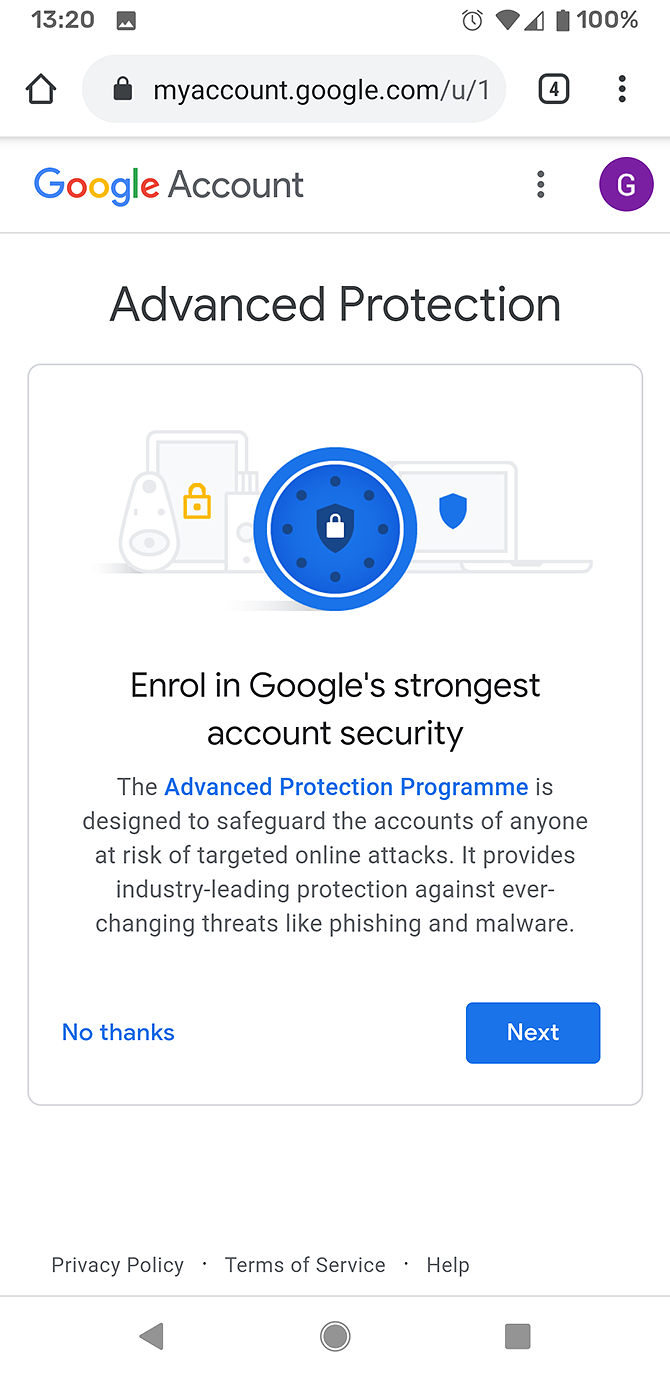
The instructions are slightly different for iPhone and Android users when enrolling in APP.

Enrolling in APP Using an Android Device

  1. Open the web browser on your Android phone and go to g.co/advancedprotection. This takes you to the APP landing page.
  2. Scroll down to the bottom of the page and find the Get started button. You’ll be taken to a splash page showing you information about the program.
  3. Click on Next to continue.
  4. Now you’ll need to enter the password for your Google account.
  5. You’ll see another splash page including a list of all your different Android devices. If you have an old phone still linked to your Google account, you’ll see it here. Make sure you select your current phone to use as a security key.
  6. Now click Enrol to register your Android device as a security key.
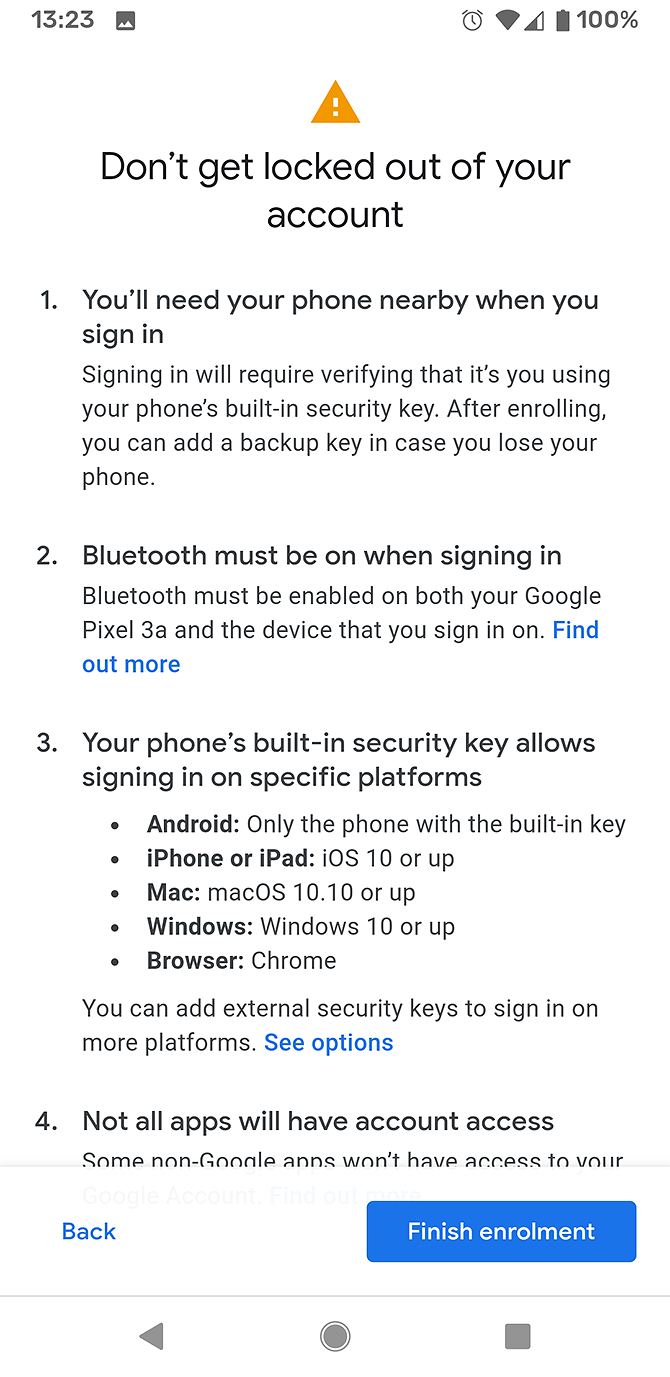
  7. You’ll see a warning screen about logging in. It will warn you that you could get locked out of your account if you don’t have your phone nearby. It also reminds you you’ll need to have Bluetooth enabled on both your phone and the device you’re signing into to log in successfully.
  8. Click Finish enrolment to complete the process.
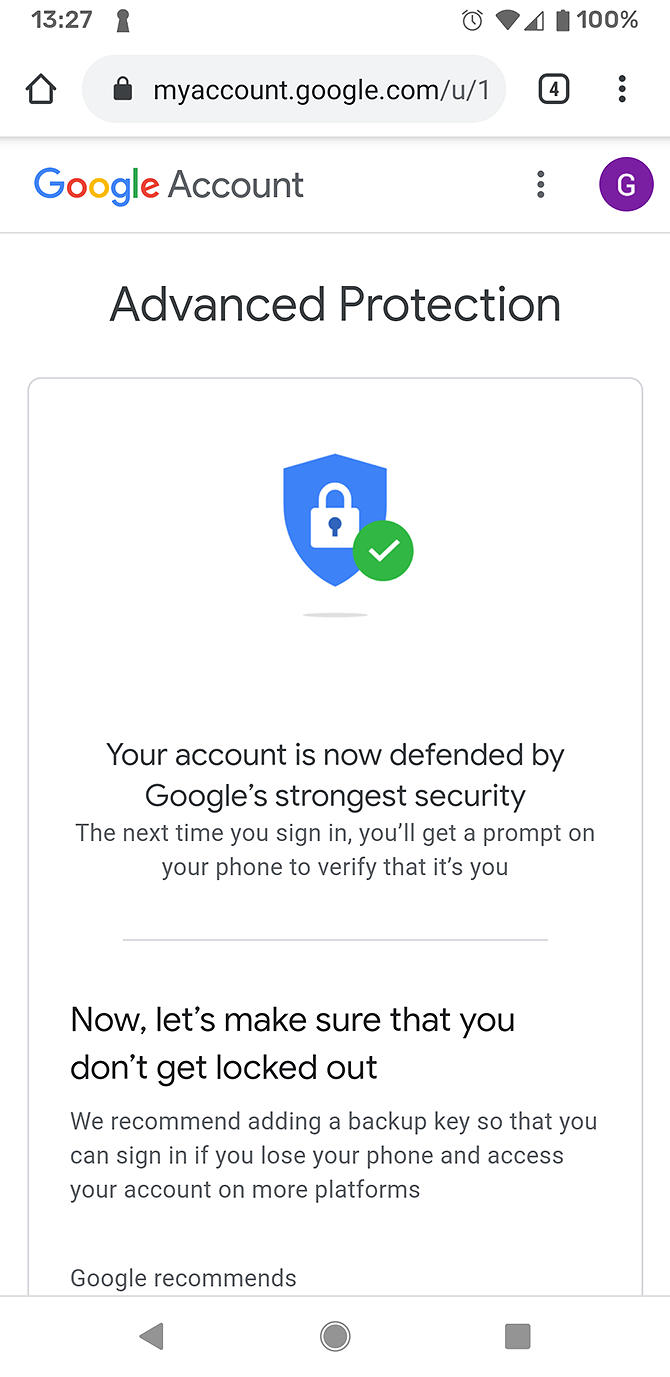
  9. The enrolment process should take just a few seconds. Then you’ll see a notification from Google Play services saying Your security key is ready. It will also show you a confirmation screen saying Your account is now defended by Google’s strongest security.
  10. Google recommends you purchase a physical security key as well to prevent the security measure from accidentally locking you out of your account. You can buy a key from this page or hit Add key later to skip this step.
  11. Now the enrolment is complete and you’re taken to a Security Check-up page.

Enroll in APP Using an iPhone

To use your iPhone as a security key, you first need to install an app called Google Smart Lock. This app is available for free from the App Store. It allows your phone to act as a security key via Bluetooth.

Once this app is installed and set up, you follow the same instructions as for the Android device above. Head to g.co/advancedprotection in your phone browser and follow the instructions from there.

How to sign it to Google using APP

Sign-in with APP works only with the Google Chrome browser. When you use Chrome to navigate to a Google site like gmail.com, it will direct you to log in with your username and password as normal.

Once you have entered your password, you will see an extra step. It will say 2-step Verification and your browser will connect to your phone via Bluetooth to confirm that it’s you.

Note that, for this to work, the device on which you’re browsing and your phone both need to have Bluetooth enabled. This means the devices can contact each other and can confirm your identity.

Once the devices connect, they confirm your login. Now you can access your Google mail, calendar, and other apps as usual.

How to Remove Your Device as a Security Key

You may need to remove your account from the APP. For example, your phone might get damaged and you have to send it off for repair. Or if you are going away and will be without your phone for some time. In these cases, you should remember to cancel APP before you are away from your device. This will prevent APP from locking you out of your account.

To remove APP from your account, go to https://myaccount.google.com/signinoptions/two-step-verification. Look in the Your second step section. You should see APP with your device as the key listed here. To remove it, click on the dustbin icon.

Remember to set another method of two-factor authentication instead, such as an authenticator app or SMS.

Protect Your Google Account Using Your Phone as a Security Key

The APP is a great option for users who need a higher level of security, especially those who are concerned about phishing.

To learn more about changes you can make to your online behavior to improve your security, don’t forget to check out our list of essential Google account settings to change for better security.

Read the full article: Protect Your Google Account Using the Advanced Protection Program

MakeUseOf

Tagged AccountAdvancedGoogleProgramProtectProtectionUsing

Post navigation

50 Kodi Keyboard Shortcuts You Need to Know
How to Delete Old Time Machine Backups on Your Mac

Related Posts

How to Set Up a VPN on an Amazon Fire TV Stick

September 9, 2017September 9, 2017Malika Karoum Dubai

5 Free Digital Whiteboard Alternatives to Google and Microsoft’s Whiteboard Apps

July 21, 2018July 21, 2018Malika Karoum Dubai

5 Free Apps to Turn Selfies into Emojis, Stickers, & Even Music

August 6, 2016August 6, 2016Malika Karoum Dubai

RSS Malika Karoum Global News

  • Global energy crisis will be ‘daily issue’ in Canada soon, IEA chief warns
    "I think Canada is a bit insulated, if I may say, (of) what's happening. In fact, big things are happening," Faith Birol said in a fireside chat with Energy Minister Tim Hodgson.
    Globalnews Digital
  • Hantavirus: 3 evacuated from cruise ship as new Swiss case confirmed
    The World Health Organization has identified the Andes strain of hantavirus, which can be transmitted from person to person, in passengers who were on the cruise ship.
    Katie Scott
  • Montreal-area home sales fall 7% in April as rising prices weigh on demand: board
    Montreal-area home sales fell 7% in April compared with last year as economic uncertainty and affordability challenges kept some buyers cautious.
    Globalnews Digital
  • Saskatchewan passes law on involuntary drug treatment
    Addictions Minister Lori Carr says those admitted into forced treatment would be provided legal representation throughout all stages of their assessment. 
    Globalnews Digital
  • Suspect donning monkey mask among several sought in Niagara thefts
    Niagara regional police said Tuesday officers are investigating nine incidents they believe are connected: four in St. Catharines, four in Lincoln and one in Grimsby.
    Aaron D’Andrea
  • ZoRaw chocolate recalled in Canada due to ‘improperly declared milk’
    The product, 72 per cent Cacao No Sugar Added Dark Chocolate - Extra Dark, was distributed across Ontario, British Columbia, Alberta and Quebec and online platforms.
    Adriana Fallico
  • RCMP continue search for man wielding a machete outside of Halifax
    Police issued two alerts Tuesday evening warning people in Gaetz Brook, about 30 kilometres east of the city, about a dangerous man carrying the weapon. 
    Globalnews Digital
  • Joly ‘in regular contact’ with Honda as report says EV plant being halted
    A spokesperson for Honda Canada told Global News they 'have nothing to report at this time' after a Japanese report suggested the carmaker is halting plans.
    Uday Rana
  • Report on OpenAI expected from federal, provincial privacy watchdogs
    Privacy watchdogs plan to release a report Wednesday on OpenAI, the company behind the popular artificial intelligence-powered chatbot ChatGPT.
    Globalnews Digital
  • Alaska landslide set off CN Tower-sized tsunami last year — and a warning for B.C.
    The study found the tsunami might not have happened but for the rapid retreat of a glacier that would have been in the landslide's path.
    Globalnews Digital

MALIKA KAROUM METAVERSE 2025

  • ChatGPT Codex 5.5: The Greatest AI Coding Tool Ever? 🚀
    May 3, 2026 by Dr. Mfon Akpan
    Is this the end of manual coding?In today’s video, we are diving deep into ChatGPT Codex 5.5, the latest evolution in AI-driven development. Whether you are a seasoned software engineer or just starting your coding journey, this tool is a total game-changer for productivity, debugging, and rapid prototyping.In this video, you will learn:✅ Key Features: […]
  • GPT-5.5 IS HERE! The New OpenAI Model Everyone’s Talking About!
    April 26, 2026 by Dr. Mfon Akpan
    The wait is finally over! OpenAI has just shocked the world with the release of GPT-5.5, a next-generation frontier model that is redefine the boundaries of artificial intelligence. In this video, we break down every single major announcement from the launch, explaining exactly why this new model is the most discussed topic in technology right […]
  • DARKCODE: The Ultimate Hacking & Programming Guide (2026)
    April 19, 2026 by Dr. Mfon Akpan
    Welcome to the frontier of digital mastery. Whether you're a seasoned developer or just starting your journey into the shadows of the web, DARKCODE is your definitive roadmap to understanding the architecture of the modern world.In this comprehensive guide, we strip away the jargon to give you a clear, high-energy look at the intersection of […]
  • Meeting with Gael Gadah 📱
    April 12, 2026 by Dr. Mfon Akpan
    Most businesses do not fail overnight. They bleed slowly from bad decisions, weak systems, and no clear strategy.In this episode, I sit down with Gael Gadah to break down what it really takes to turn a struggling business around. This is not theory. This is execution.We talk about: • How to identify what is actually […]
  • CLAUDE CODE LEAKED! 🚨 The Truth Exposed (Anthropic’s Secret)
    April 5, 2026 by Dr. Mfon Akpan
    Is the future of AI coding in trouble? 🚨 Anthropic’s new Claude Code has been leaked, and the details coming out are shocking. In this video, we dive deep into exactly what was found in the leak, how it impacts developers, and what this means for the competition between Claude, ChatGPT, and GitHub Copilot.We’re breaking […]
  • Replit Agent 4 is INSANE! (Build Entire Apps in Seconds 🚀)
    March 29, 2026 by Dr. Mfon Akpan
    We’re looking at the new reasoning engine, the improved UI/UX capabilities, and why this might be the end of "manual" coding as we know it. 🔥 What we cover: Setting up Replit Agent 4 Prompting for complex app logic Real-time debugging and deployment Comparison: Agent 3 vs Agent 4 If you're looking to build your […]
  • NVIDIA JUST CHANGED EVERYTHING! 🤯 (NemoClaw Explained)
    March 22, 2026 by Dr. Mfon Akpan
    Stop everything. NVIDIA just dropped NemoClaw and it is the MISSING PIECE for the AI revolution. If you thought autonomous agents were risky, think again—the game has officially changed! 🚀 In this video, we’re diving deep into why NVIDIA NemoClaw is the biggest announcement for AI developers and enthusiasts this year. We’re talking full-scale autonomous […]
  • NVIDIA PersonaPlex Explained
    March 15, 2026 by Dr. Mfon Akpan
    What if AI could operate using multiple expert personalities at the same time?In this video, I break down NVIDIA PersonaPlex, a new framework designed to orchestrate multiple AI personas to solve complex tasks. Instead of relying on a single model response, PersonaPlex allows specialized AI agents to collaborate, debate, and refine answers. Think of it […]
  • ChatGPT 5.4 is officially here, and it’s a massive leap forward for AI agents and professional workflows. 🚀
    March 8, 2026 by Dr. Mfon Akpan
    Since ChatGPT 5.4 just launched (March 5, 2026), your content should focus on its "Thinking" mode and native "Computer Use" capabilities.ChatGPT 5.4 is officially here, and it’s a massive leap forward for AI agents and professional workflows. 🚀OpenAI just dropped the most significant update to the GPT-5 family. In this video, we go hands-on with […]
  • The Professional Choice: How Basis AI is Building the Autonomous Accounting Firm
    March 1, 2026 by Dr. Mfon Akpan
    🚀 What is Basis? Basis isn't just a chatbot; it’s a "multi-agent" architecture designed specifically for accounting firms. These agents don't just answer questions—they execute end-to-end tasks like month-end closes, tax preparation, and audit testing.In this video, we cover:The Multi-Agent Shift: Why "Agentic AI" is different from traditional software.Workflow Automation: How Basis handles tax, audit, […]
News Portal | Theme: News Portal by Mystery Themes.