Skip to content
Sunday, May 03, 2026
MALIKA KAROUM METAVERSE

MALIKA KAROUM METAVERSE

– THE NEW WEB 3.0 FUTURE –

  • Definitions of Metaverse
  • Malika Karoum: Artificial Intelligence
  • Malika Karoum: ChatGPT
  • Malika Karoum Metaverse
    • Metaverse Digital Virtual Environment
    • A FUTURE METAVERSE
    • METAVERSE -THE NEW FUTURE-
    • Art – The Next Generation
    • The New Web 3.0
    • Metaverse project
    • What are Non Fungible Tokens (NFT-tokens)?
    • What are NFTs?
  • Malika Karoum Media

Your Microsoft Account: 5 Things Every Windows User Should Know

Malika Karoum Online News
January 24, 2021January 24, 2021Malika Karoum DubaiLeave a Comment on Your Microsoft Account: 5 Things Every Windows User Should Know

Your Microsoft account is Microsoft’s single sign-on user account. It allows you to log in to Microsoft’s services, apps, and devices running on its operating systems with a single set of credentials. Whether you are new to Microsoft accounts or just need some help going about it, we have created this FAQ to help you.

We will go through some of the basic and lesser-known things Microsoft users should know. If you need help creating a new account, reopening a closed one, changing your account’s email, or adding a device to it, this FAQ is for you.

How to Create a New Microsoft Account

There are two fairly simple ways of creating a new Microsoft Account:

  1. Using an existing email address: You just need to go to Microsoft accounts home page and click the Create a Microsoft account button. Then, simply provide a valid email address and you can start the process of creating your own Microsoft Account.
  2. Signing up for a Microsoft email address: You can also sign up for an email address from any of Microsoft’s email services designated domains (@hotmail.com; @outlook.com; @live.com; etc). Then, you can use that email address as a Microsoft Account to sign in to other Microsoft services.

How to Change, Add, or Remove the Email Address or Phone Number for Your Microsoft Account

You can add up to 10 email addresses and 3 phone numbers to your Microsoft Account. These are called aliases and all of them use the same contacts, online storage, subscriptions, and password. Then, you can log into your Microsoft Account using any of your registered email addresses and phone numbers.

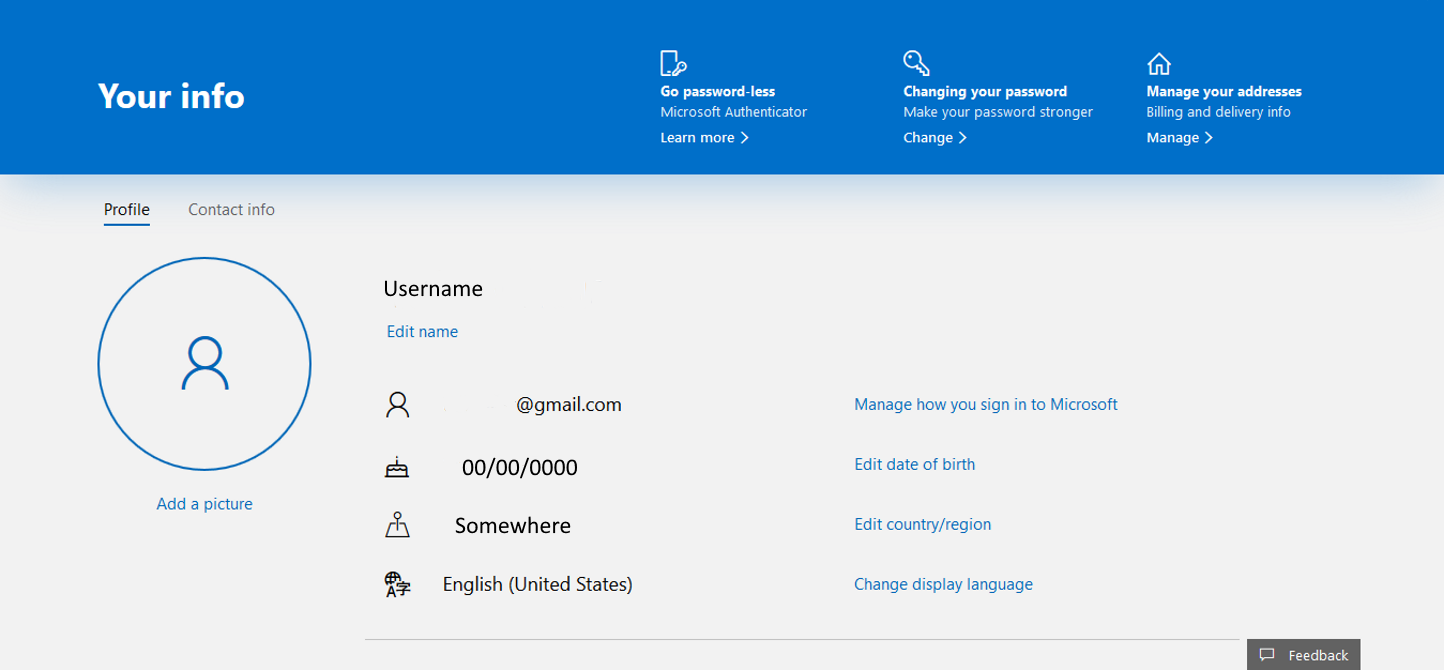
If you want to change, remove, or add an alias to your account, you just need to sign in to your Microsoft account and click the Your info button on the upper left side of the screen. This page will display your profile.
Click where it says Manage how you sign in to Microsoft, at the right side of where your user information is displayed.

Because of the sensitive nature of the information you are about to change, Microsoft will prompt you to verify your password and identity with a code. Provide the code and you will be granted access.
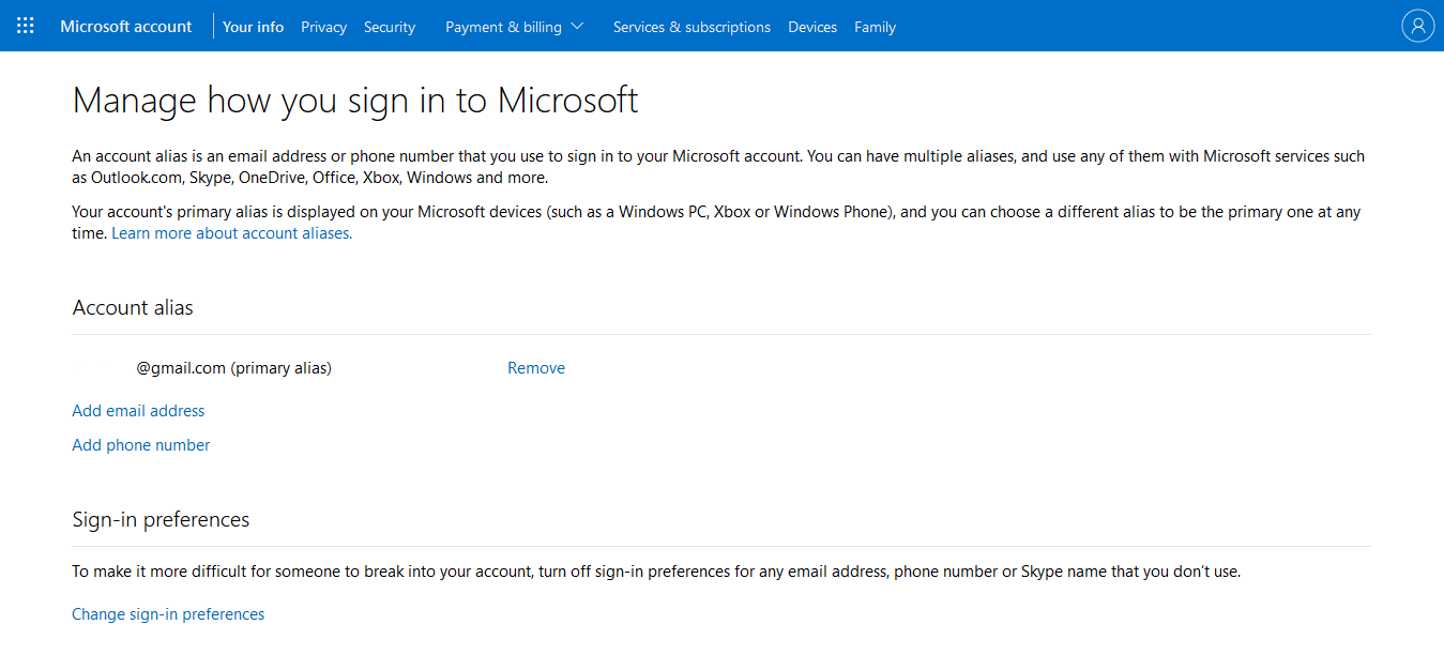
Once inside the Manage how you sign in to Microsoft page, it will present you with the options: Add email, Add phone number, and Remove under the Account alias header. Choose the option you need.

How to Add a Device to Your Microsoft Account
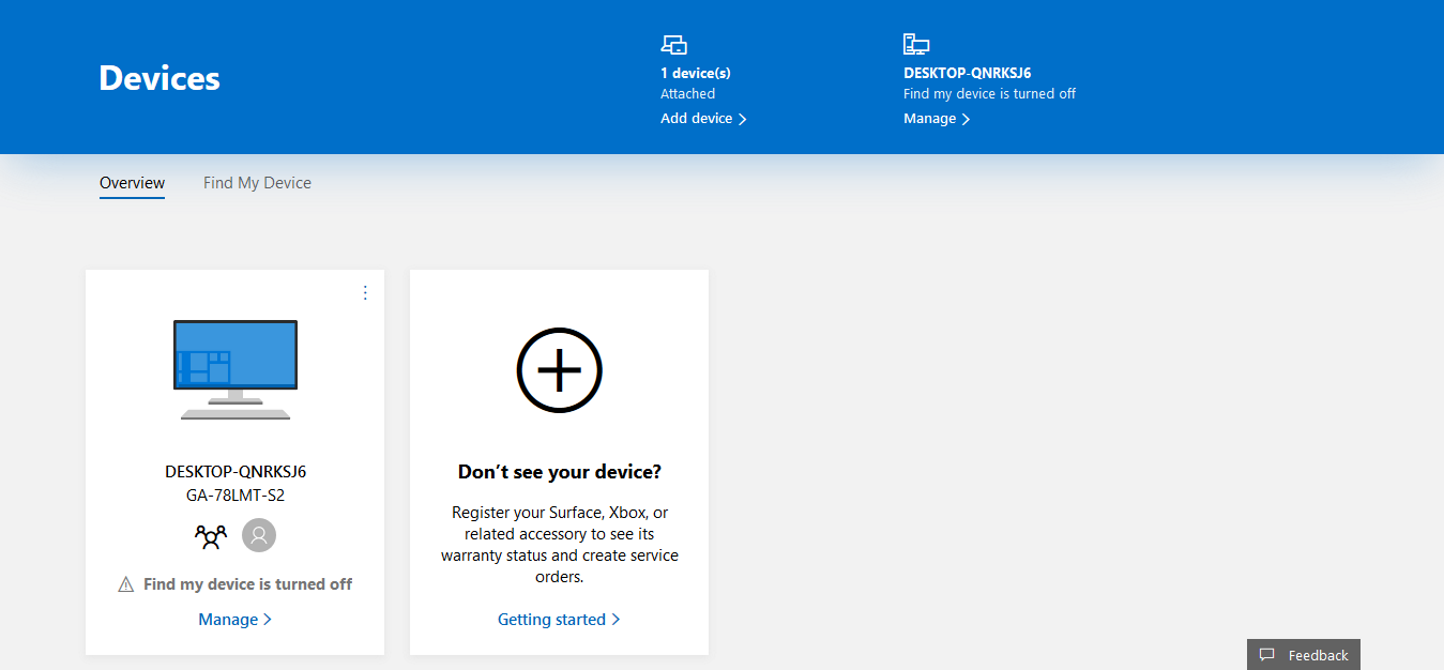
There are several ways to add a device to your Microsoft account, but which one will suit you best depends on the device you want to add. You can even add your iOS and Android devices to your Microsoft account.

Surface, Xbox, or Related Accessories

One way to add your Surface, Xbox, or related accessories is by signing in to your Microsoft account and clicking on the devices button on the upper right side of the page. Then just click where it says Don’t see your device? and follow the instructions.

  • Xbox and Windows 10 Devices: Sign in to your Microsoft account through the device you wish to add.
  • Windows 10 PC: Sign in to the Microsoft Store.
  • iOS Device: Download Microsoft Edge from the Apple App Store and sign in with your Microsoft account.
  • Android Device: Download either Microsoft Edge, Microsoft Launcher, or Your Phone Companion from the Google Play Store and sign in with your Microsoft account.

How to Find Your Microsoft Account

If you forget your Microsoft Account e-mail address or you got an error message saying “That Microsoft account does not exist” when trying to sign in to your account, there are a couple of ways to find your account.

Find Your Microsoft Account Using Your Security Information

You can find your Microsoft account by going into Microsoft’s Recover your username page and entering an alternate email address or phone number associated with your account. Then you will need to request a security code from Microsoft.

After receiving the security code in the email or phone number you used, you need to enter it and select Next. Finally, when you see the account you were looking for, select Sign in.

Find Your Microsoft Account in the Microsoft Product or Service Your Use

If you never set up or don’t have access to your security contact information, you can also find your Microsft Account’s username within other Microsoft products or services you associated with your account:

  • Windows 10: Use a Windows 10 device where you are already logged in. Select Start > Settings > Accounts. You will see the usernames associated with your account under Email & Accounts.
  • Office: In Microsoft 365 or Office 2016 or newer, open an Office app. Then select File > Account. Under Product Information, you will see Belongs to with the associated username.
  • Email accounts: You can check your email accounts to see if you have any receipts for purchases from Microsoft.
  • Xbox: Xbox users are identified by their Gamertag within Xbox. They usually forget they created an email address when they signed up for Xbox. Depending on your Xbox device, you can find your email address displayed in the upper right or left corner of Xbox’s Home screen.

For more information on finding your Microsoft account on your Xbox, you can visit the Find your Microsoft account email address page on Xbox’s support site.

Microsoft accounts expire after 2 years of inactivity. So, if you can’t find your Microsoft account using any of these options, your account might be closed.

How to Reopen a Closed Microsoft Account

After closing a Microsoft account, there’s a 60-day period during which you can reopen it. After that 60-day period expires, your Microsoft account is then permanently deleted.

If you want to reopen a closed Microsoft account follow the next steps:

  1. Go to Microsoft account’s home page and sign in.
  2. Receive and enter a security code.

After entering the code, your Microsoft account will be reopened. Your subscriptions, profiles, and content that were on the account before being closed will be available to you again.

Related: How to Delete Your Microsoft Account & Create a Local Windows 10 Login

Still Can’t Find the Solution to Your Problem?

If you still couldn’t find a solution to your problem after going through this Microsoft account essentials FAQ, you don’t need to worry. You can resolve a Microsoft account issue by visiting Microsoft’s official support site. Microsoft’s support site has a dedicated page tagged Account & billing that offers to troubleshoot for Microsoft account issues.

MakeUseOf – Feed

Tagged AccountEveryKnowMicrosoftShouldThingsUserWindows

Post navigation

Italy Limits Access to TikTok Following a Child’s Death
How to Fix the 0xc00007b Error in Windows

Related Posts

3 Spooky Rainmeter Effects for Halloween

October 22, 2017Malika Karoum Dubai

L@@K ~~ Marketing : An Introduction by Gary Armstrong and Kotler 11th Edition

September 7, 2015Malika Karoum Dubai

3 Essential Virtual Desktop Tips for Windows 10 Productivity

April 24, 2020April 24, 2020Malika Karoum Dubai

RSS Malika Karoum Global News

  • Families participate in Saskatoon’s first Autism Aviation Day
    Saskatoon's first Autism Aviation Day gave families a unique opportunity to practice navigating airport procedures in a supportive, low-stress environment.
    Payton Zillich
  • RCMP renew spring safety reminders after suspected drowning in Banff National Park
    At least four separate rescues have taken place in Banff National Park in the past month, with one man being reported dead after jumping into fast-moving water.
    Sean Previl
  • Toronto Maple Leafs put Sundin, Chayka in charge of front office: MLSE
    Mats Sundin, the Maple Leafs' franchise’s former captain and all-time points leader, returns after 13 seasons with the Toronto team.
    Globalnews Digital
  • Leafs hire Sundin, Chayka to lead front office
    The Toronto Maple Leafs have landed on a new brain trust.
    Globalnews Digital
  • Patient at Winnipeg hospital charged for assaulting health-care workers
    Winnipeg police say they were called to a hospital on May 1 for reports of a patient assaulting and threatening health-care workers. He was arrested and now faces charges.
    Sean Previl
  • Sandy Beach, Alta. residents remain on evacuation standby as wildfire burns homes
    Sturgeon County has issued a local state of emergency for the summer village of Sandy Beach, Alta., after wildfire claimed three homes and damaged a fourth.
    Kabi Moulitharan
  • 2 children in hospital with serious injuries after collision in Burnaby
    Burnaby RCMP say officers responded to a report of a collision involving two pedestrians, an 11-year-old boy and a nine-year-old girl, at about 12:45 p.m.
    Globalnews Digital
  • Maritimes set for wet start to workweek with heavy rain, possible snow forecast
    Environment Canada has issued special weather statements for Sunday into Monday in Nova Scotia, Prince Edward Island and parts of southern and eastern New Brunswick. 
    Sean Previl
  • Carney should state what ‘leverage’ Canada has in U.S. talks: Poilievre
    Earlier in the week, U.S. Trade Representative Jamieson Greer warned a group of Canadian politicians that Ottawa shouldn't try to use energy as leverage in the trade talks.
    Globalnews Digital
  • ‘Pearson is a disaster’: Poilievre backs Toronto island airport expansion
    The Ford government has tabled legislation which would give the province the power to take control of land in and around Billy Bishop Airport.
    Sean Previl

MALIKA KAROUM METAVERSE 2025

  • ChatGPT Codex 5.5: The Greatest AI Coding Tool Ever? 🚀
    May 3, 2026 by Dr. Mfon Akpan
    Is this the end of manual coding?In today’s video, we are diving deep into ChatGPT Codex 5.5, the latest evolution in AI-driven development. Whether you are a seasoned software engineer or just starting your coding journey, this tool is a total game-changer for productivity, debugging, and rapid prototyping.In this video, you will learn:✅ Key Features: […]
  • GPT-5.5 IS HERE! The New OpenAI Model Everyone’s Talking About!
    April 26, 2026 by Dr. Mfon Akpan
    The wait is finally over! OpenAI has just shocked the world with the release of GPT-5.5, a next-generation frontier model that is redefine the boundaries of artificial intelligence. In this video, we break down every single major announcement from the launch, explaining exactly why this new model is the most discussed topic in technology right […]
  • DARKCODE: The Ultimate Hacking & Programming Guide (2026)
    April 19, 2026 by Dr. Mfon Akpan
    Welcome to the frontier of digital mastery. Whether you're a seasoned developer or just starting your journey into the shadows of the web, DARKCODE is your definitive roadmap to understanding the architecture of the modern world.In this comprehensive guide, we strip away the jargon to give you a clear, high-energy look at the intersection of […]
  • Meeting with Gael Gadah 📱
    April 12, 2026 by Dr. Mfon Akpan
    Most businesses do not fail overnight. They bleed slowly from bad decisions, weak systems, and no clear strategy.In this episode, I sit down with Gael Gadah to break down what it really takes to turn a struggling business around. This is not theory. This is execution.We talk about: • How to identify what is actually […]
  • CLAUDE CODE LEAKED! 🚨 The Truth Exposed (Anthropic’s Secret)
    April 5, 2026 by Dr. Mfon Akpan
    Is the future of AI coding in trouble? 🚨 Anthropic’s new Claude Code has been leaked, and the details coming out are shocking. In this video, we dive deep into exactly what was found in the leak, how it impacts developers, and what this means for the competition between Claude, ChatGPT, and GitHub Copilot.We’re breaking […]
  • Replit Agent 4 is INSANE! (Build Entire Apps in Seconds 🚀)
    March 29, 2026 by Dr. Mfon Akpan
    We’re looking at the new reasoning engine, the improved UI/UX capabilities, and why this might be the end of "manual" coding as we know it. 🔥 What we cover: Setting up Replit Agent 4 Prompting for complex app logic Real-time debugging and deployment Comparison: Agent 3 vs Agent 4 If you're looking to build your […]
  • NVIDIA JUST CHANGED EVERYTHING! 🤯 (NemoClaw Explained)
    March 22, 2026 by Dr. Mfon Akpan
    Stop everything. NVIDIA just dropped NemoClaw and it is the MISSING PIECE for the AI revolution. If you thought autonomous agents were risky, think again—the game has officially changed! 🚀 In this video, we’re diving deep into why NVIDIA NemoClaw is the biggest announcement for AI developers and enthusiasts this year. We’re talking full-scale autonomous […]
  • NVIDIA PersonaPlex Explained
    March 15, 2026 by Dr. Mfon Akpan
    What if AI could operate using multiple expert personalities at the same time?In this video, I break down NVIDIA PersonaPlex, a new framework designed to orchestrate multiple AI personas to solve complex tasks. Instead of relying on a single model response, PersonaPlex allows specialized AI agents to collaborate, debate, and refine answers. Think of it […]
  • ChatGPT 5.4 is officially here, and it’s a massive leap forward for AI agents and professional workflows. 🚀
    March 8, 2026 by Dr. Mfon Akpan
    Since ChatGPT 5.4 just launched (March 5, 2026), your content should focus on its "Thinking" mode and native "Computer Use" capabilities.ChatGPT 5.4 is officially here, and it’s a massive leap forward for AI agents and professional workflows. 🚀OpenAI just dropped the most significant update to the GPT-5 family. In this video, we go hands-on with […]
  • The Professional Choice: How Basis AI is Building the Autonomous Accounting Firm
    March 1, 2026 by Dr. Mfon Akpan
    🚀 What is Basis? Basis isn't just a chatbot; it’s a "multi-agent" architecture designed specifically for accounting firms. These agents don't just answer questions—they execute end-to-end tasks like month-end closes, tax preparation, and audit testing.In this video, we cover:The Multi-Agent Shift: Why "Agentic AI" is different from traditional software.Workflow Automation: How Basis handles tax, audit, […]
News Portal | Theme: News Portal by Mystery Themes.